Secure data room for maritime projects
Control sensitive maritime data. Beyond email and shared drives.
Exchange technical, confidential and export-controlled project documentation with customers, suppliers, shipyards and external partners. With controlled access, compliance approvals, malware scanning and an audit trail of every relevant action.
The Problem
Maritime projects run on shared knowledge.
Every newbuild and retrofit depends on drawings, specifications and certificates passing between many companies. Email, shared drives and download links answer one question: how do I send the file? Secure Data also answers who may receive it, which version was shared, who approved it and what happened next.
- Once sent, files are out of your hands
- A different version in every inbox
- No record of who opened what
- Hours lost hunting for a single specification
- Attachments from unknown senders, opened unchecked
- Links anyone can forward
- Access you can change or revoke at any time
- One up-to-date version for everyone
- A record of every relevant action
- Every document found in seconds with full-text search
- Every upload scanned before anyone opens it
- Country and IP rules for your organisation
What Secure Data does
Four ways Secure Data keeps your projects moving.
Named recipients, expiry dates, one-time passcodes and approvals decide who receives which document.
02 Control what they can doRoles, security profiles and malware scanning define what happens in each project space.
03 Find every documentFull-text search across your project documentation, within each user’s access rights.
04 Prove what happenedKeep complete audit records ready for audits and reviews.
01 Access
Control who gets access.
Secure file sharing for shipyards, suppliers and shipowners should be a controlled process, not just a link. Bring partners on board faster without giving up control.
Secure Sharing
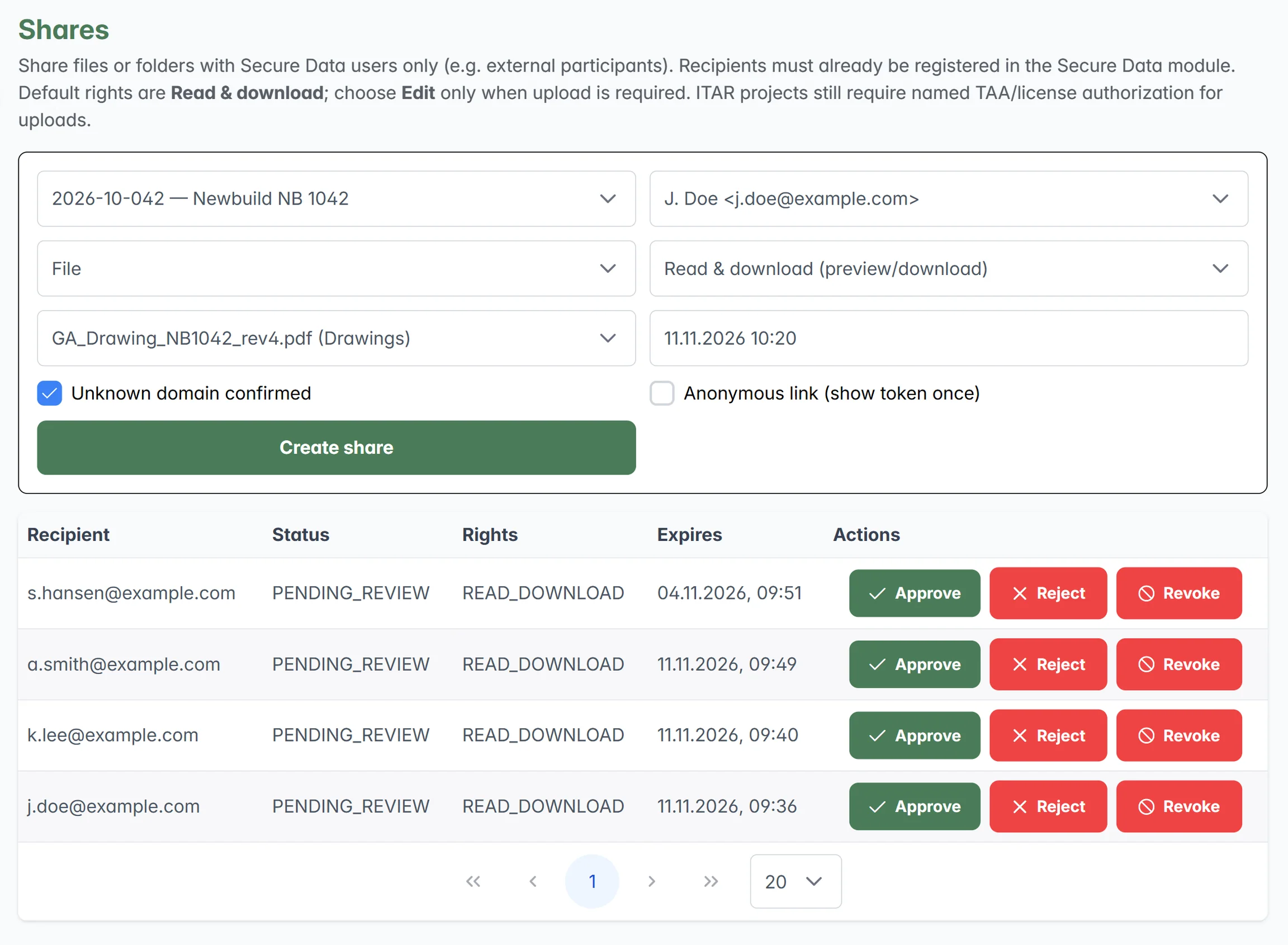
Share with named recipients only. Choose read-only, read and download, or edit, add expiry dates and require a one-time passcode for external shares. You can revoke access at any time.
Dynamic Watermarking
Downloads of PDF and image files can carry their own traceable identity: recipient, email address, time, project and a unique ID. A copy found outside the platform can be traced back to the download it came from.
Approval Workflows
Sensitive transfers can require a compliance review first. Security-critical changes can follow the four-eyes principle, so nobody approves their own change.
02 Control
Control what they can do.
One controlled space for every project, with the level of protection you define for it, right from the first upload.
Project Workspaces
Each project gets its own workspace with a security profile: Standard, Confidential, Export Controlled or ITAR Relevant. Folder structures can be predefined, so documentation is filed consistently from day one.
Role-Based Access
Role-based permissions for internal users, external participants and compliance approvers, so users only get the rights their task requires.
Document Control
Know exactly which document you are working with. Every version keeps its history and metadata, including the classification and export-control attributes set at upload. No parallel copies across inboxes and folders.
Export Control
Keep export-control details on every document and apply stricter sharing rules where needed. See how it works
Malware Protection
Every upload is scanned for malware before it is released into the project space. Suspicious files can be blocked and logged as security events, so partners can’t bring unchecked files into a shared space.
How Export Control Works
Export control, built into the way you work.
Controls for export-controlled and ITAR-relevant technical data, from classification to the final download, without holding your project up.
-
01
Classify
Set a project to Export Controlled or ITAR Relevant. Files can be marked as export-controlled or ITAR.
-
02
Define who
Only registered users can receive shares. Your organisation decides from which countries access is allowed.
-
03
Review
Every share in an export-controlled project goes to compliance review before access is granted.
-
04
Share under control
Named recipients, expiry dates and one-time passcodes. Public links are blocked for export-controlled content.
-
05
Keep the evidence
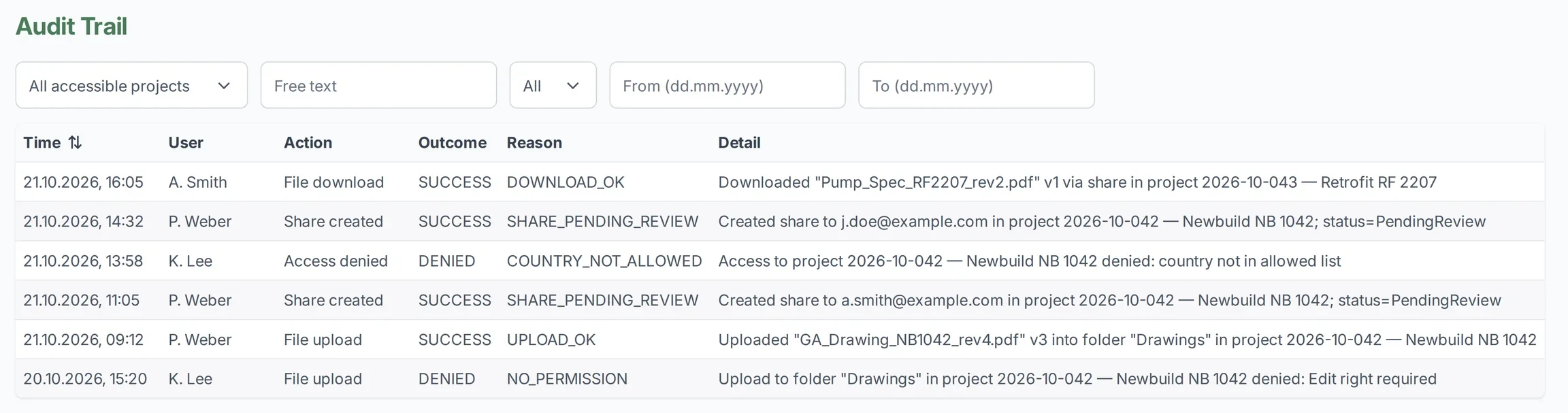
Every share, review and upload is recorded in the audit trail and shown on the compliance dashboard.
Stricter rules for ITAR-relevant projects
Uploads require named TAA or licence authorisation, and ITAR-marked files and authorised persons are tracked on the compliance dashboard.
Secure Data provides controls that support your export-control processes. Responsibility for compliance remains with your organisation.
03 Find
Stop searching inboxes. Find it in seconds.
One searchable place for every drawing, specification and certificate, inside your access controls.
Full-Text Search
Search file names, metadata and document content across your project. Optional OCR makes scanned documents searchable too.
Search within permissions
Results only include documents the user is authorised to see. Access rights and security profiles apply to every search.
04 Prove
Prove what happened.
Every relevant action leaves evidence, ready before anyone asks.
-
Audit Trail
Relevant actions are logged with user, time, project, action, outcome and reason, and can be exported as a report. This supports internal reviews, external audits and incident investigations.
-
Compliance Dashboard
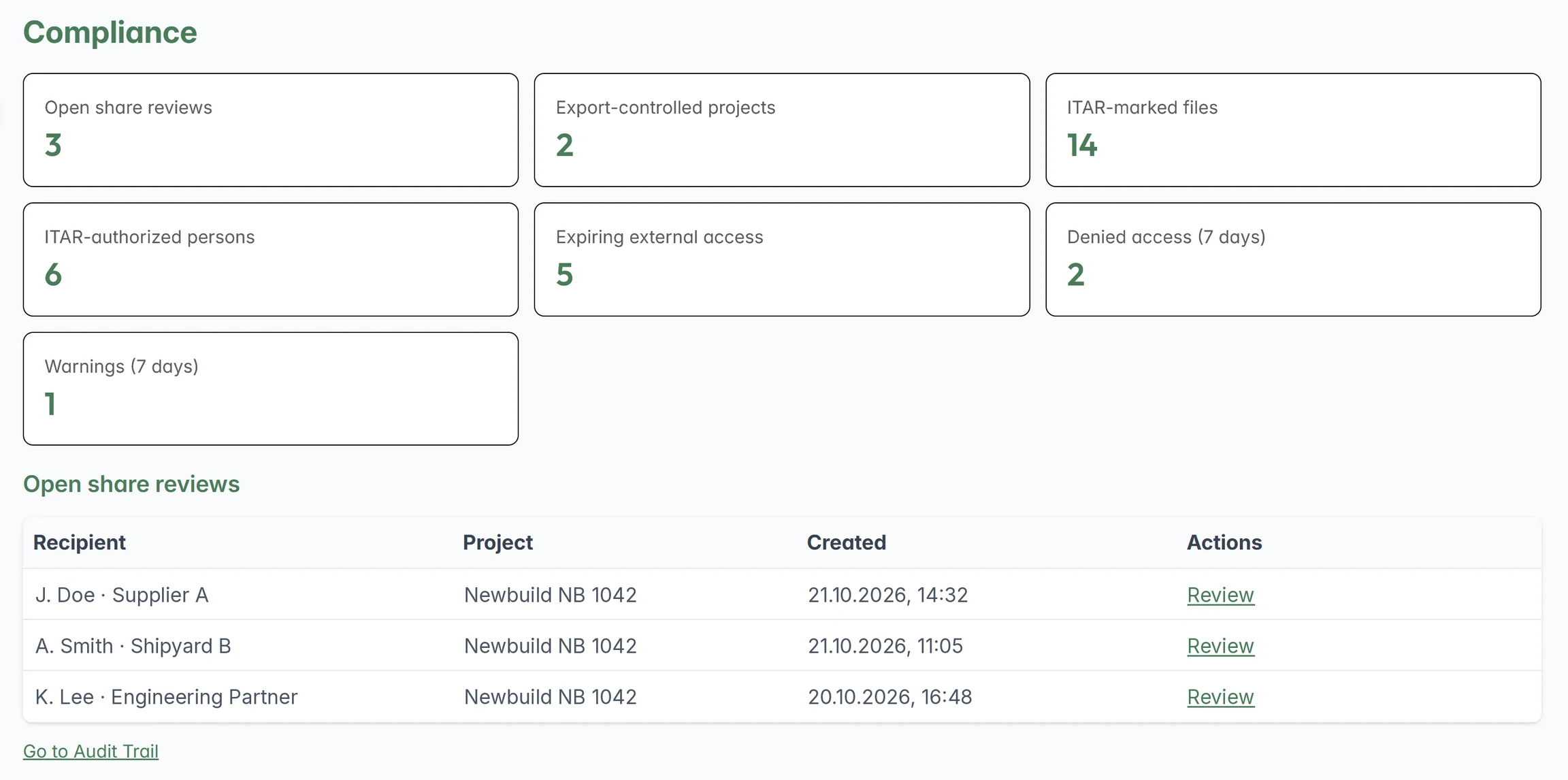
See where attention is required: open share reviews, export-controlled projects, ITAR-marked files, ITAR-authorised persons, expiring external access, denied access attempts and warnings.
-
Retention & Export
Define retention periods centrally, for example 5, 7 or 10 years. Export projects with documents, versions, metadata, classifications, export-control and audit information.
Who It’s For
Built for everyone involved in your project.
Bring every partner on board without losing control of your drawings.
Run controlled project spaces for drawings, technical specifications, supplier documentation, certificates and engineering documents. Every file your suppliers upload is scanned before it reaches your team, and at handover you export complete projects with every version and record.
Share your drawings, not your know-how.
Provide technical documentation to customers and project partners in a dedicated project space instead of email attachments or open download links. You control access, downloads and how long they last, and downloads can carry the recipient’s name.
Find the right drawing before the retrofit begins.
Exchange technical documentation securely with vessels, shipyards, manufacturers, suppliers, engineering partners and external specialists. Keep newbuild and retrofit documentation in one searchable place, so your superintendents find specifications in seconds.
Approve with confidence, without holding projects up.
Keep central control of access rights, external sharing, export-control metadata, approval workflows, authorised persons and audit evidence, and see all relevant activity at a glance.
Security & Sovereignty
For your IT team.
- Hosting
- IONOS cloud infrastructure in Germany
- Access
- Login, one-time passcodes for external shares and role-based permissions
- Uploads
- Malware scanning before release
- Audit
- Complete audit trail with export
- Export control
- Classification at upload and compliance approval for sensitive shares
- Built by
- BLUVIT, specialists in IT security
Part of ComplyEdge
Part of the ComplyEdge platform.
Secure Data extends ComplyEdge beyond IHM and MD/SDoC management. It is available as a standalone module or together with IHM Maintenance and MD/SDoC Management.
FAQ
Frequently asked questions
Isn’t this just another file-sharing tool?
No. As well as sharing files, Secure Data manages access, versions, approvals and audit records in a single workflow.
Do our partners need a ComplyEdge licence?
No. External partners don’t need their own licence. You invite them to your project and decide what they can see and do.
Does Secure Data make us export-control compliant?
Secure Data provides controls that support your export-control processes. Responsibility for compliance remains with your organisation.
Is Secure Data ITAR certified?
No. Secure Data provides controls for export-controlled and ITAR-relevant technical data. It is not a certification, and responsibility for compliance remains with your organisation.
Where is our data stored?
Secure Data runs on IONOS cloud infrastructure in Germany.
Do we need IHM Maintenance to use Secure Data?
No. Secure Data is available as a standalone module, or together with IHM Maintenance and MD/SDoC Management.
How much does Secure Data cost?
Pricing depends on your requirements. Book a demo and we’ll put together an offer that fits your projects.
Let’s Connect
See what Secure Data can do for your next project.
We’ll walk you through a sample project, from secure sharing and approvals to full-text search and the audit trail, and answer your questions along the way.
Book a demoPricing on request. External partners need no licence.